

Splines
A spline is a smooth curve through points you place: the route of a patrol boat, a rail a camera glides along, or the line of a race track. Other entities can follow it, and scripts can ask where along it something is.
Drawing a spline
Section titled “Drawing a spline”- Add an entity and give it Add Component > Spline. It starts as a short straight line of two points.
- With the entity selected, turn on Edit Spline (the spline icon) in the scene page’s toolbar. The tool is available only while the selected entity has a Spline.
- Shape the curve in the viewport:
- Drag a point to move it.
- Select a point to show its two handles, and drag a handle to bend the curve there. Hold Shift while dragging to let the two handles point different ways, for a sharp corner.
- Ctrl+click on the curve to add a point there.
- Hover over a point and press Delete (or X) to remove it. A spline keeps at least two points.
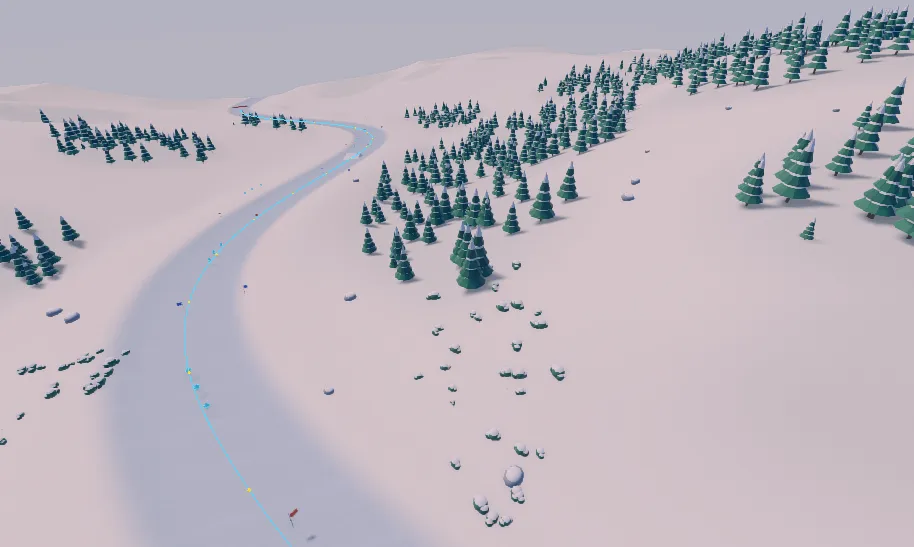
Each change is one undo step. Closed in the inspector joins the last point back to the first, for a loop, and Point Count shows how many points the curve has. Points are edited only in the viewport.
The points belong to the entity: move, turn or scale the entity, and the whole curve goes with it.
Following a spline
Section titled “Following a spline”Give another entity a Path Follow component and set its Spline to the entity with the curve:
- Speed (1): metres a second along the curve. A negative speed goes backwards.
- Distance (0): where along the curve it is, in metres. Set it to start part way along.
- Playing (on): whether it moves.
- Loop (on): at the end of an open curve, go back to the start. Without it, the follower stops at the end (or at the start, going backwards) and Playing turns off. A closed curve always goes round.
- Align To Tangent (on): face along the curve as it goes, with the entity’s -Z axis pointing forward.
It moves only while the game plays or the scene page simulates, not in edit mode. Keep the follower at the top of the hierarchy, with no parent: it places itself in world space.
function Boat:onUpdate(dt) local follow = PathFollowComponent.of(self.entity) if Input.wasPressed("Fire") then follow.playing = not follow.playing endendvoid onUpdate(double dt){ PathFollowComponent@ follow = PathFollowComponent::of(self); if (Input::wasPressed("Fire")) { follow.playing = !follow.playing; }}Asking about a curve
Section titled “Asking about a curve”SceneSplines measures a curve and finds points on it. Each call takes the entity that has the
spline:
function Rival:onUpdate(dt) local track = self.entity.scene:find("RacingLine") -- the entity with the spline local splines = SceneSplines.of(self.entity.scene) local here = splines:closestPoint(track, self.entity:worldPosition()) local ahead = splines:sampleAtDistance(track, here.distance + 10.0) Log.info("lap " .. here.distance / splines:length(track)) -- ahead.position is where to steer; ahead.tangent the way the track runs thereend[null, "The racing line"] Entity@ track;
void onUpdate(double dt){ SceneSplines@ splines = SceneSplines::of(self.scene); SplineHit@ here = splines.closestPoint(track, self.worldPosition()); SplineHit@ ahead = splines.sampleAtDistance(track, here.distance + 10.0f); Log::info("lap " + here.distance / splines.length(track)); // ahead.position is where to steer; ahead.tangent the way the track runs there}length(entity)is the curve’s length in metres.sampleAtDistance(entity, distance)returns the point that far along.closestPoint(entity, position)returns the point on the curve nearest a position, with how far along it is.sampleAt(entity, t)takes a position by segment instead: 0 is the first point, 1 the second, and so on.pointCount(entity)andisClosed(entity)describe the curve.
The three sampling calls return valid (false when the entity has no spline), position and
tangent (the direction of the curve there, length 1) in world space, and distance and t
along the curve. Lengths and distances are measured on the curve as it is drawn, before the
entity’s scale, so keep a spline’s entity at scale 1 if you rely on them in metres. Scripts read
curves; they cannot move a curve’s points.