

Connecting an agent
The engine speaks the Model Context Protocol (MCP), so an AI agent such as Claude Code can work on a project with the same tools the editor uses: import and cook assets, write scenes, write and check scripts, play the game and look at it, and export it.
There are two ways in:
- The editor serves the project it has open. The agent works on what you are looking at: you watch its changes arrive, can undo them, and can play what it built. This is the usual way.
Tools.Mcpserves a project with no editor running, for an agent working on its own: building content in bulk, or in a script.
Both serve the same engine tools. The editor adds the ones that need it: its pages and layout, building in an open scene, the scene page’s selection and camera, its menu commands, clicking and typing in its window, playing the game, and the profiler.
Through the editor
Section titled “Through the editor”-
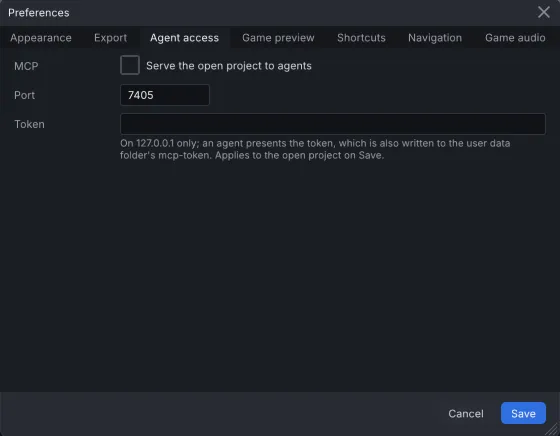
Open the project, then choose Edit > Preferences… and the Agent access tab.
-
Turn on Serve the open project to agents and choose Save. The first time, the editor makes a token, the secret an agent must present. It shows the token in the Token field and writes it to
mcp-tokenin the user data folder (~/.local/share/assiduousengine/mcp-tokenon Linux,%LOCALAPPDATA%\assiduousengine\mcp-tokenon Windows). -
Connect the agent to
http://127.0.0.1:7405/mcp, with the token as a bearer token. The port is the Port field on the same tab (7405 by default). For Claude Code:Terminal window claude mcp add --transport http engine-editor http://127.0.0.1:7405/mcp \--header "Authorization: Bearer $(cat ~/.local/share/assiduousengine/mcp-token)"
The server listens on your own computer only (127.0.0.1), and only while a project is open. To
serve a single run without changing the preference, start the editor with --mcp, or with
--mcp-port <port> for another port:
Tools.Editor path/to/project --mcpWithout the editor
Section titled “Without the editor”Tools.Mcp is built with the editor, into the same folder. It talks over standard input and
output, so the agent starts it itself:
claude mcp add engine -- /path/to/AssiduousEngine/Bin/Debug/Linux64-Clang/Tools.McpThe agent then creates or opens a project with its project_create and project_open tools.
Do not point Tools.Mcp at a project an open editor is editing: both would write the same
files. Use the editor’s own server for that project instead.
The first thing an agent reads
Section titled “The first thing an agent reads”Both servers carry the engine’s guide for agents, docs://McpGuide.md: how the tools fit
together, the order to use them in, and their pitfalls. An agent should read it first, and asking
it to is a good way to start a session. The servers also carry the guides to scripting, assets,
scenes and hosting, the list of known issues, and a description of the scene format generated
from the engine itself.
After you rebuild the engine, restart the editor or Tools.Mcp: a server started before the
rebuild still runs the old engine.
Next: What an agent can do.