

Navigation
Navigation lets a guard, an animal or a crowd find its own way across a level, around walls and up ramps. You bake a navigation mesh, the walkable surface of an area, and agents walk on it to where their scripts send them.
Baking a navigation mesh
Section titled “Baking a navigation mesh”- Make a Navigation Zone asset in the Assets panel (New > Navigation Zone). The baked mesh is kept in it.
- Add an entity with a Nav Mesh Zone component, and set its Zone to the asset.
- Size its box with Extents, half its size along each axis (20, 10, 20), to cover the area agents will walk.
- Press Bake Navigation in its inspector, then Build > Cook All so the game has the new mesh.
The bake walks on two kinds of ground inside the box: static, solid rigid bodies and terrain. It does not look at meshes, so a floor that is only a mesh, with no static body, is not walkable. Dynamic and kinematic bodies and triggers are left out too. The baked mesh follows the zone’s entity, so moving the zone moves the mesh with it.
Baking is not automatic. Bake again after changing the level.
The bake’s settings describe who walks there, so a doorway too narrow for them is left out:
- Agent Radius (0.6) and Agent Height (2): the walker’s size.
- Agent Max Climb (0.9): the tallest step it can take.
- Agent Max Slope Degrees (45): the steepest ground it walks on.
- Cell Size (0.3) and Cell Height (0.2): how finely the ground is measured. Smaller is more exact, and slower to bake.
A zone moves up to Max Agents agents at once (128); raise it for a larger crowd. It sets aside room for that many when the game starts, so ask for what the scene will use.
A scene can have several zones, each with its own asset and its own settings.
Seeing it
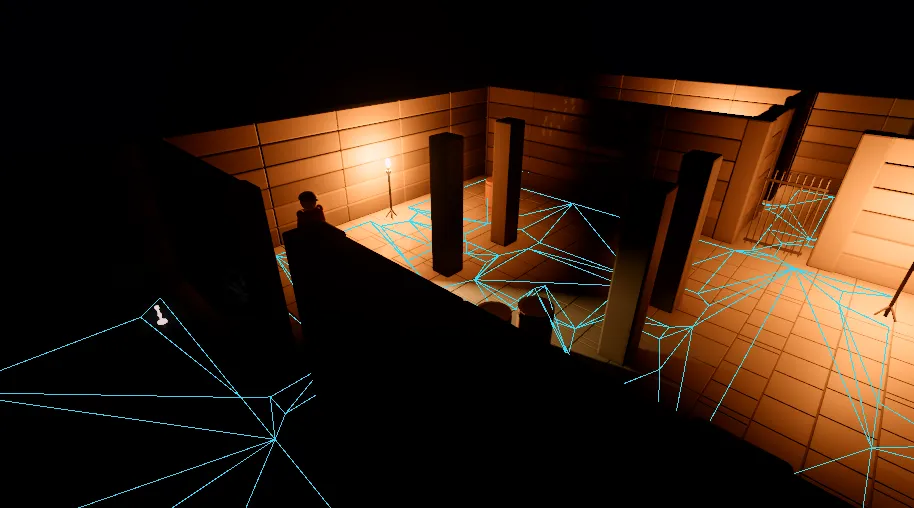
Section titled “Seeing it”Select the scene’s own row at the top of the hierarchy, and the inspector shows the scene’s settings. Their Navigation section has Debug Draw, which draws the baked mesh of each zone, in the editor and in the game. With it on, Debug Draw Paths draws a line from each agent to where it is going, with its state and speed above it (in red when no way was found), and Debug Draw Bake Stages shows how the last bake saw the ground.
Agents
Section titled “Agents”Give a walker a Nav Agent component:
- Radius (0.6) and Height (2): its size.
- Max Speed (3.5), in metres a second, and Max Acceleration (8), in metres a second per second.
- Stop Distance (0): how close it must get to count as arrived. At 0 it walks onto the point itself.
- Avoid Others (on): it steers round other agents. Turn it off for a character a player drives. An agent that avoids others holds back from anyone standing ahead of it, which feels like an invisible wall to a player. With it off, the agent goes straight where it is driven and pushes past people.
- Move Entity (on): the agent moves its entity. Turn it off to move the entity yourself, for instance through a character or an animation, reading the velocity the agent wants.
An agent must start inside a zone, and its entity should not have a parent. Agents are set up when the game starts, or on their first frame when they are added later.
Send it somewhere from a script:
-- self.route is a list of Float3 points, and self.stop starts at 1.function Guard:onUpdate(dt) local agent = NavAgentComponent.of(self.entity) if agent:finished() then local next = self.route[self.stop] agent:navigate(next.x, next.y, next.z) self.stop = self.stop % #self.route + 1 endendarray<Float3@> m_route; // the points to visituint m_stop = 0;
void onUpdate(double dt){ NavAgentComponent@ agent = NavAgentComponent::of(self); if (agent.finished() && m_route.length() > 0) { Float3@ next = m_route[m_stop]; agent.navigate(next.x, next.y, next.z); m_stop = (m_stop + 1) % m_route.length(); }}navigate(x, y, z)sets where to go, and the agent finds the way.navigateAt(x, y, z, speed, stopDistance)sets the pace and the stop distance too.finished()is true once it has arrived, andremaining()says how far it has left.stop()stops it where it is.setSpeed(speed)changes its pace, to break into a run, andsetStopDistance(distance)its stop distance;speed()reads the pace.move(vx, vz)drives it at a velocity, in metres a second across the ground, instead of to a point: a player’s stick, sent each frame. There is no path to wait for, and it stays on the navmesh.move(0, 0)stands it still.warp(x, y, z)puts it somewhere else at once, stopped there (a respawn, a door to another room). Moving the entity is not enough: the agent’s place is the crowd’s, and it would step back.velocityX(),velocityY()andvelocityZ()are the velocity it wants, for an animation or for moving the entity yourself, anddesiredSpeed()is the speed it is aiming for.targetState()says where its request stands: 0 no request, 1 looking for the way, 2 the way was found, 3 moving bymove, and 4 no way was found.